 Persistent Q: EQ Brush
Ever since the parametric equalizer became a studio staple, frequency-domain processing has followed more or less the same ritual. Pick a filter type, dial in a center frequency, set your gain, define the bandwidth with a Q value, and repeat until you've built something that sounds right. It's a workflow that's held up remarkably well over the decades, and for good reason: it gives you precise, repeatable control over every aspect of the frequency response.
But precision comes with overhead, and that overhead adds up fast when the EQ task gets complex. Broad tonal shaping might call for several shelf and bell filters working together. Corrective work can mean a cluster of narrow adjustments scattered across the spectrum. Before long, you're not really thinking about the sound anymore, you're thinking about filter construction, which isn't quite the same thing.
That distinction is subtle, but it matters more than it might seem.
Most of the time, what an engineer actually wants isn't a specific arrangement of filters. It's a particular shape in the frequency response. Traditional EQ workflows just happen to require you to arrive at that shape indirectly, by stacking and tweaking individual bands until the curve approximates what you were hearing in your head. The shape is the goal, but the filters are what you're actually manipulating to get there.
Graphical equalizers tried to close that gap by putting more bands on screen at once, though they brought their own set of tradeoffs: fixed frequency positions, limited flexibility, and not much room to fine-tune the actual filter behavior. A more direct approach was needed, one that let you work with the frequency response itself rather than the filters that generate it.
That's the idea behind EQ Brush.
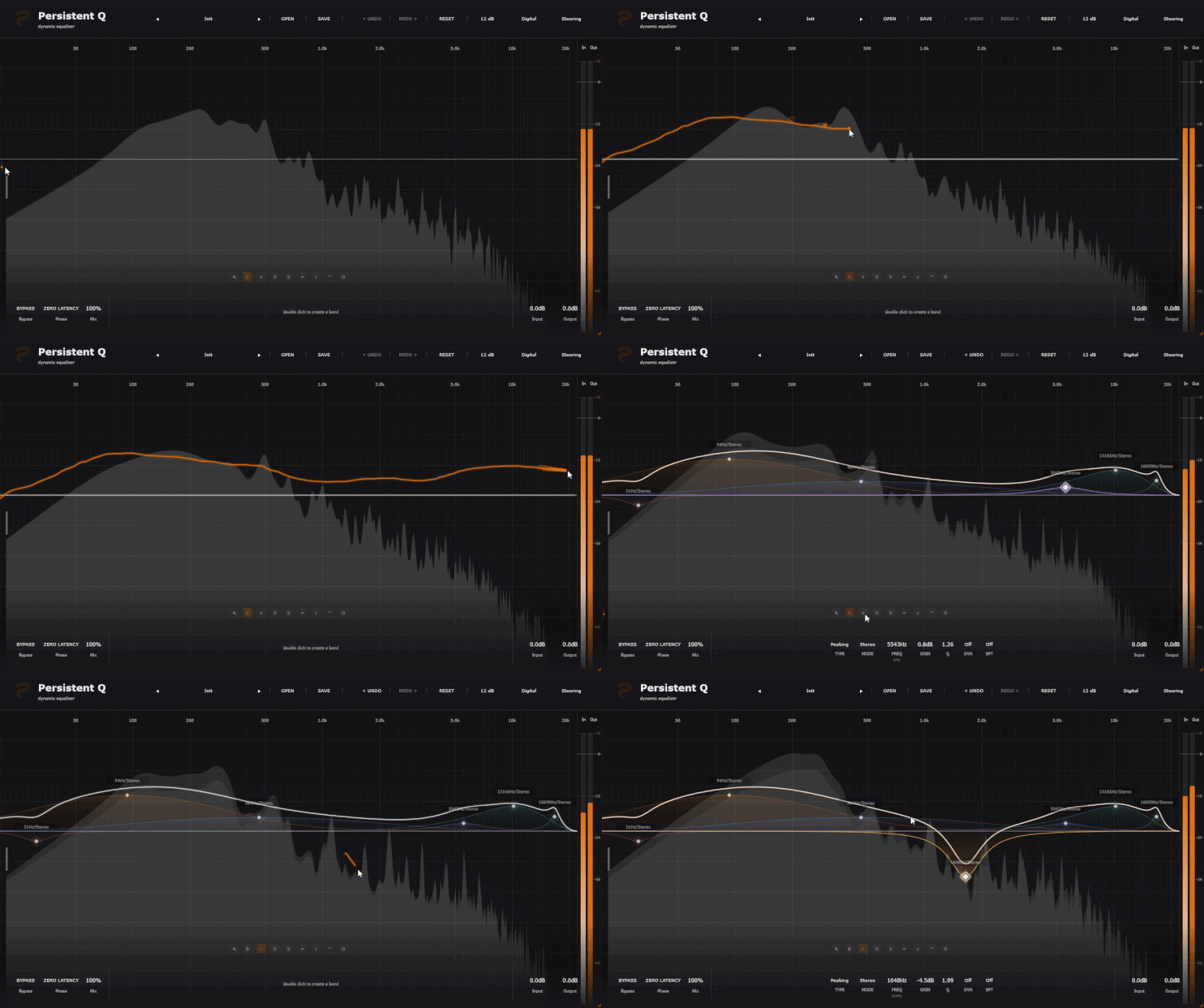
Instead of building a frequency response out of individual bands, EQ Brush lets you draw the spectral shape you want directly onto the display. You interact with the curve itself, and Persistent Q handles the job of figuring out which filter configuration best reproduces what you've drawn. The underlying math happens in the background, so you can stay focused on the sound.
The goal here isn't to replace traditional EQ workflows. EQ Brush is designed for the situations where drawing a response is simply more intuitive than constructing one from scratch, and there are more of those situations than you might expect.
When you're tracking down an audible problem, for instance, you often have a sense of the general shape of the correction you need well before you've pinpointed the exact frequencies involved. The same goes for creative tonal work, where the contour you're imagining might be easier to sketch than to describe with numbers. In both cases, drawing the response can get you where you're going much faster than building it filter by filter.
Of course, the value of any drawing-based workflow depends heavily on how much control you have after the initial pass, and EQ Brush includes a set of specialized editing tools specifically designed for that kind of refinement.
The standard Brush tool lets you freely draw boosts, cuts, and reshapes directly on the display. Add Brush extends an existing contour outward while keeping the surrounding structure intact, which is handy for gradually building up a complex shape without accidentally disrupting what's already working. Smoothing softens sharp transitions and promotes continuity between adjacent regions, particularly useful when you're going for broad tonal changes or want to clean up any jagged edges that crept in during editing. Flatten does the opposite, pulling local variations back toward neutral and helping you simplify a response that's gotten overly complex.
Erosion and Deposition round out the toolkit with something that feels more like physical sculpting. Erosion gradually removes portions of the existing curve while Deposition adds material into selected regions, giving you another layer of control for detailed contour work without forcing you out of the graphical mindset.
All of this looks visual on screen, but everything it does is fundamentally acoustical. The graphical display is just a more direct way of reaching the spectral information underneath.
One thing worth knowing is that whatever EQ Brush generates stays fully integrated with the rest of Persistent Q. The filter bands it creates are completely accessible for follow-up work: individual parameter adjustments, dynamic processing, spectral processing, steering operations, all of it. The brush workflow feeds into the same architecture rather than existing off to the side, which means you're never locked out of the traditional controls once you've made your initial sketch.
In practical terms, EQ Brush tends to shine in three specific situations. During early mixing or sound design sessions, it's great for roughing out broad tonal ideas quickly before committing to a specific filter structure. For complex spectral shapes that would normally require a pile of overlapping bands, direct drawing usually gets you there more efficiently. And for exploratory sessions where you're not working toward a predetermined target so much as feeling out what the material wants, having direct access to the frequency response curve makes it much easier to follow your ears without getting slowed down by filter management.
For most of EQ history, equalizer interfaces have put parameter control front and center: frequency, gain, Q, and not much else to interact with. Those controls are still essential and they're not going anywhere, but they've never been the only possible approach to shaping a frequency response.
EQ Brush introduces a response-first way of working, where the curve itself is the thing you're manipulating and the filter representation follows from that rather than the other way around. Persistent Q incorporates this alongside its full parametric capabilities as part of a broader effort to make equalization feel more direct, more visual, and more adaptable to the way engineers actually work. Draw the shape, refine it with the sculpting tools, and hand it off to the filter engine. The precision of a professional parametric EQ, with a workflow that keeps the focus on the sound.